Python Program
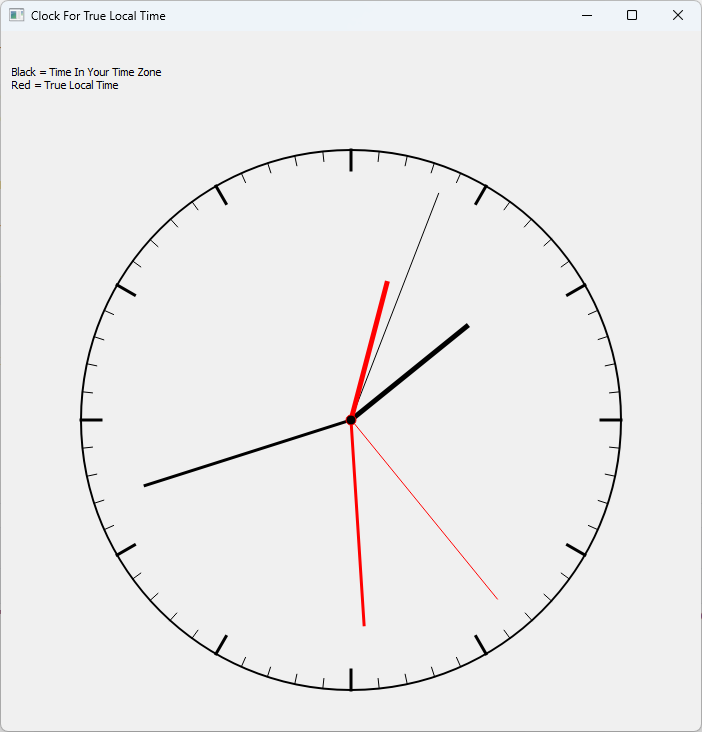
This small Python program displays a clock face that shows both standard time (for the time zone) and local time. To calculate the EOT correctly, you must enter the correct position, including longitude and latitude (see class ClockWidget).
        # CHANGE TO YOUR HOME LOCATION
        self.latitude = 47.8125
        self.longitude = 12.9636
        # CHANGE TO YOUR TIME ZONE
        self.tz = ZoneInfo("Europe/Berlin")
import sys
import math
from datetime import datetime, timedelta

from PyQt5.QtCore import Qt, QTimer, QPointF
from PyQt5.QtGui import QPainter, QPen, QColor
from PyQt5.QtWidgets import (
    QApplication,
    QWidget,
    QVBoxLayout,
    QFormLayout,
    QLabel,
)

from zoneinfo import ZoneInfo


def equationOfTime(day_of_year):

    # Approximation of the Equation Of Time

    B = math.radians((360 / 365) * (day_of_year - 81))

    return (
        9.87 * math.sin(2 * B)
        - 7.53 * math.cos(B)
        - 1.5 * math.sin(B)
    )


def trueLocalTime(dt, longitude):
    # compute local time from time zone
    day = dt.timetuple().tm_yday
    # compute Equation Of Time
    eot = equationOfTime(day)
    # fimd the time at the standard - meridian of the time zone
    utc_offset_h = dt.utcoffset().total_seconds() / 3600
    standard_meridian = utc_offset_h * 15

    # correct by 4 minutes per longitude deviation
    longitude_correction = 4 * (longitude - standard_meridian)

    correction = longitude_correction + eot

    return dt + timedelta(minutes=correction)


class ClockWidget(QWidget):

    def __init__(self):
        super().__init__()
        # CHANGE TO YOUR HOME LOCATION
        self.latitude = 47.8125
        self.longitude = 12.9636
        # CHANGE TO YOUR TIME ZONE
        self.tz = ZoneInfo("Europe/Berlin")

        self.setMinimumSize(600, 600)

        self.timer = QTimer(self)
        self.timer.timeout.connect(self.update)
        self.timer.start(1000)

    def draw_hand(self, painter, angle_deg, length, width, color):

        angle = math.radians(angle_deg - 90)

        x = length * math.cos(angle)
        y = length * math.sin(angle)

        pen = QPen(color, width)
        painter.setPen(pen)

        painter.drawLine(
            QPointF(0, 0),
            QPointF(x, y)
        )

    def paintEvent(self, event):

        painter = QPainter(self)
        painter.setRenderHint(QPainter.Antialiasing)

        w = self.width()
        h = self.height()

        radius = min(w, h) * 0.45

        painter.translate(w / 2, h / 2)

        # paint the dial
        painter.setPen(QPen(Qt.black, 2))
        painter.drawEllipse(
            QPointF(0, 0),
            radius,
            radius
        )

        # marks for hours
        for i in range(60):

            painter.save()

            painter.rotate(i * 6)

            if i % 5 == 0:
                painter.setPen(QPen(Qt.black, 3))
                painter.drawLine(
                    0,
                    int(-radius),
                    0,
                    int(-radius + 20)
                )
            else:
                painter.setPen(QPen(Qt.black, 1))
                painter.drawLine(
                    0,
                    int(-radius),
                    0,
                    int(-radius + 10)
                )

            painter.restore()

        now = datetime.now(self.tz)
        localtime = trueLocalTime(now, self.longitude)

        # normal time : black
        self.draw_time(
            painter,
            now,
            QColor("black"),
            radius
        )

        # true local time : red
        self.draw_time(
            painter,
            localtime,
            QColor("red"),
            radius * 0.95
        )

        painter.setBrush(Qt.black)
        painter.drawEllipse(QPointF(0, 0), 5, 5)

    def draw_time(self, painter, dt, color, radius):

        sec = dt.second + dt.microsecond / 1e6
        minute = dt.minute + sec / 60
        hour = (dt.hour % 12) + minute / 60

        min_angle = minute * 6
        hour_angle = hour * 30

        self.draw_hand(
            painter,
            hour_angle,
            radius * 0.55,
            5,
            color
        )

        self.draw_hand(
            painter,
            min_angle,
            radius * 0.80,
            3,
            color
        )

class MainWindow(QWidget):

    def __init__(self):
        super().__init__()

        self.setWindowTitle(
            "Clock For True Local Time"
        )

        self.clock = ClockWidget()

        form = QFormLayout()
        layout = QVBoxLayout()
        layout.addLayout(form)
        layout.addWidget(QLabel(
            "Black = Time In Your Time Zone \nRed = True Local Time"
        ))
        layout.addWidget(self.clock)

        self.setLayout(layout)

    def apply_settings(self):

        try:
            self.clock.latitude = float(
                self.lat_edit.text().replace(",", ".")
            )

            self.clock.longitude = float(
                self.lon_edit.text().replace(",", ".")
            )

            self.clock.tz = ZoneInfo(
                self.tz_edit.text().strip()
            )

            self.clock.update()

        except Exception as e:
            print(e)


if __name__ == "__main__":

    app = QApplication(sys.argv)

    window = MainWindow()
    window.resize(700, 700)
    window.show()

    sys.exit(app.exec_())
Running the Program
When you start the program, you should see the following clock: