Simple MCP Email - Assistant
Haven't you always wanted to be able to talk to important programs—like your email program—in natural language? This tutorial shows how to implement a simple MCP server for communicating with IMAP and SMTP mail servers.
What is MCP?
MCP stands for Model Context Protocol. It is an open-source standard created by Anthropic that acts like a universal "USB-C port" for AI. Instead of writing custom integrations for every single app or database, MCP allows AI applications (like Claude) to securely connect to external data sources, tools, and workflows in a standardized way. Because MCP is a living, standardized specification, it provides several key features to bridge the gap between AI models and your localized data:
Standardized Architecture: It uses a client-server model. The AI application acts as the Host/Client, and the external system (like a local file system, database, GitHub repo, or Slack workspace) acts as the MCP Server.
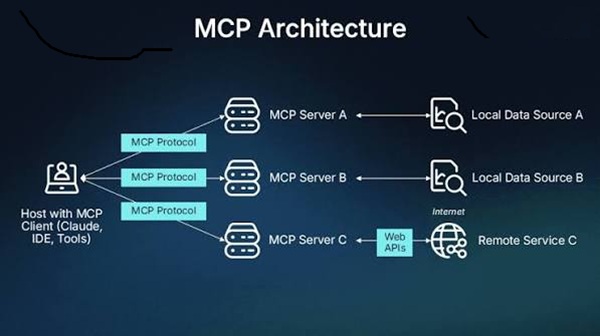
No More Isolated AI: Rather than hallucinating or being limited to its training data, an AI using MCP can retrieve real-time context from your local environment or perform actions securely through a common protocol.
Security & Authentication: The protocol incorporates frameworks like OAuth 2.1 to handle authentication, ensuring external data and remote HTTP servers are accessed securely.
My MCP - Mail Assist Architecture
MCP follows a client-server architecture where an MCP host — an AI application like Claude Code or Claude Desktop — establishes connections to one or more MCP servers. The MCP host accomplishes this by creating one MCP client for each MCP server. Each MCP client maintains a dedicated connection with its corresponding MCP server. Local MCP servers that use the STDIO transport typically serve a single MCP client, whereas remote MCP servers that use the Streamable HTTP transport will typically serve many MCP clients.
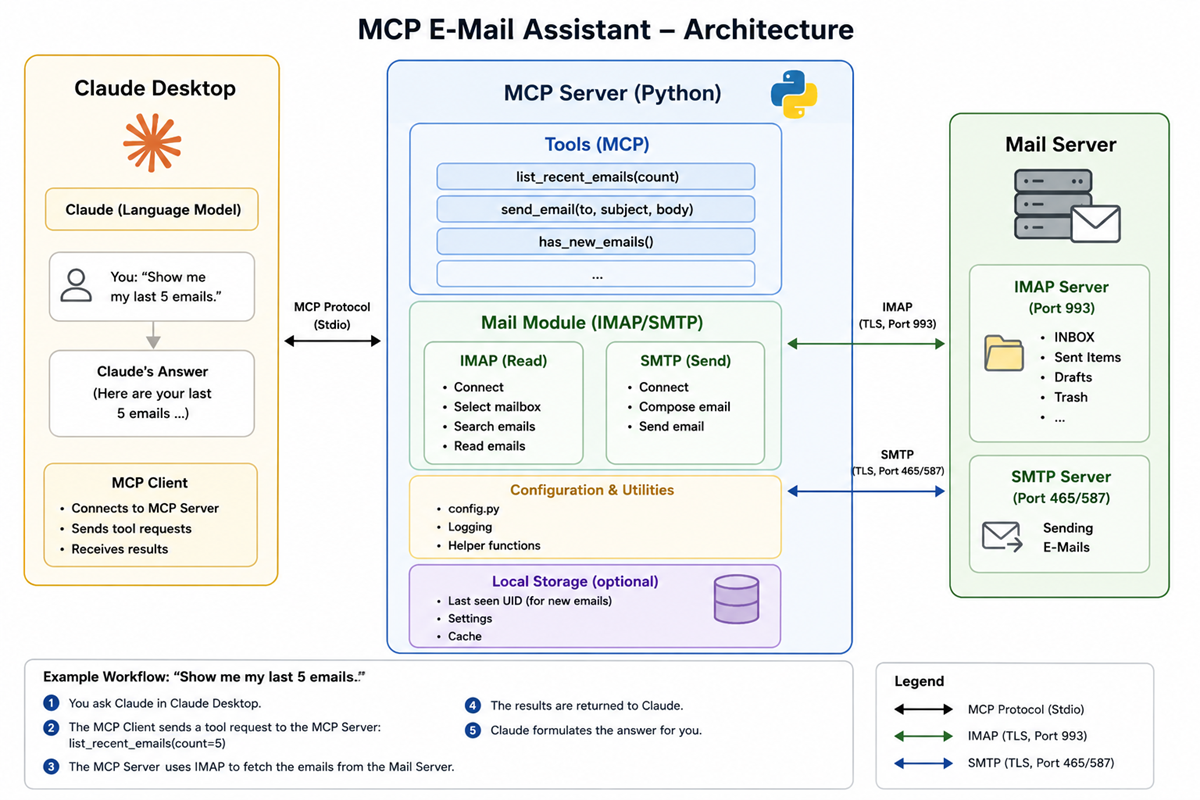
Host
Claude Desktop is used as the host. Claude Desktop is a popular MCP host because it provides a seamless bridge between a leading AI model and your local machine.
Server
The server provides all the tools that the Claude LLM can then use to process the requests. The server must provide an appropriate tool for every desired action: Implemented tools can, for example, check whether there are any unread emails, determine how many emails are in a mailbox, or display the last 10 emails received. It can also send emails.
Limitations
The project is meant to serve as a simple example, which is why relatively little functionality has been implemented; we don't want it to get too complex.
In addition, I wanted to limit myself to MCP tools that I can implement entirely using the IMAP and SMTP protocols. Of course, it would be nice to be able to use the local address book, for example, to say, “Send an email to Peter,” but that would require proprietary API calls, which would restrict the project too much.
Currently, the only authentication method supported for IMAP and SMTP servers is entering a password; methods such as OAuth2 (as required, for example, by Microsoft for its Outlook servers) are not supported in this example.